Phase 2: Migrate and validate data
In Phase 1, you set up ZDM Proxy to orchestrate live traffic to your origin and target clusters.
In Phase 2 of Zero Downtime Migration, you migrate data from the origin to the target, and then validate the migrated data.
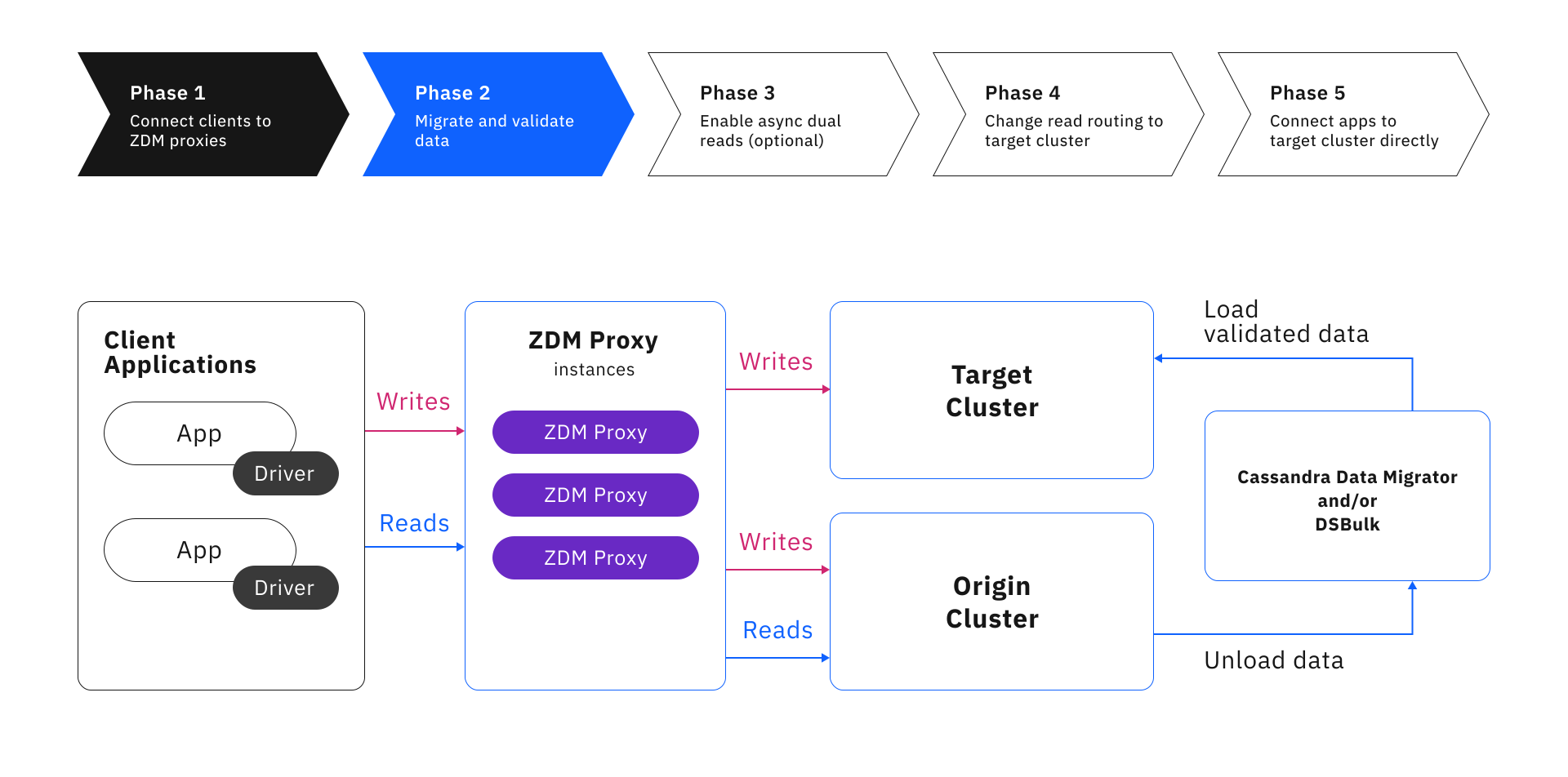
To move and validate data, you can use a dedicated data migration tool, such as Astra DB Sideloader, Cassandra Data Migrator (CDM), or DataStax Bulk Loader (DSBulk), or your can create your own custom data migration script.
Astra DB Sideloader
This tool is exclusively for migrations that move data to Astra DB.
Astra DB Sideloader is a service running in Astra DB that imports data from snapshots of your existing Apache Cassandra®-based cluster. Because it imports data directly, Astra DB Sideloader can offer several advantages over CQL-based tools like DSBulk and CDM, including faster, more cost-effective data loading, and minimal performance impacts on your origin cluster and target database.
To migrate data with Astra DB Sideloader, you use nodetool, a cloud provider’s CLI, and the Astra DevOps API:
-
nodetool: Create snapshots of your existing DSE, HCD, or open-source Cassandra cluster. For compatible origin clusters, see Astra migration toolkit. -
Cloud provider CLI: Upload snapshots to a dedicated cloud storage bucket for your migration.
-
Astra DevOps API: Run the Astra DB Sideloader commands to write the data from cloud storage to your Astra DB database.
You can use Astra DB Sideloader alone or with ZDM Proxy.
For more information and instructions, see About Astra DB Sideloader.
Cassandra Data Migrator (CDM)
You can use CDM for data migration and validation between Cassandra-based databases. It offers extensive functionality and configuration options to support large and complex migrations as well as post-migration data validation.
You can use CDM alone, with ZDM Proxy, or for data validation after using another data migration tool.
For more information, see Use Cassandra Data Migrator (CDM) with ZDM Proxy.
DataStax Bulk Loader (DSBulk)
DSBulk is a high-performance data loading and unloading tool for Cassandra-based databases. You can use it to load, unload, and count records.
Because DSBulk doesn’t have the same data validation capabilities as CDM, it is best for migrations that don’t require extensive data validation, aside from post-migration row counts.
You can use DSBulk alone or with ZDM Proxy.
For more information, see About DataStax Bulk Loader (DSBulk).
|
The DSBulk Migrator tool, which was an extension of DataStax Bulk Loader (DSBulk), is deprecated. This tool is no longer recommended. Instead, use the unload, load, and count commands included with DSBulk, or use another data migration tool, such as CDM. |
Other data migration processes
Depending on your origin and target databases, there might be other ZDM-compatible data migration tools available, or you can write your own custom data migration processes with a tool like Apache Spark™.
To use a data migration tool with ZDM Proxy, it must meet the following requirements:
-
Built-in data validation functionality or compatibility with another data validation tool, such as CDM. This is crucial to a successful migration.
-
Preserves the data model, including column names and data types, so that ZDM Proxy can send the same read/write statements to both databases successfully.
Migrations that perform significant data transformations might not be compatible with ZDM Proxy. The impact of data transformations depends on your specific data model, database platforms, and the scale of your migration.
Next steps
|
Don’t proceed to Phase 3 until you have replicated all preexisting data from your origin cluster to your target cluster, and you have taken time to validate that the data was migrated correctly and completely. The success of your migration and future performance of the target cluster depends on correct and complete data. If your chosen data migration tool doesn’t have built-in validation features, you need to use a separate tool for validation. |
After using your chosen data migration tool to migrate and thoroughly validate your data, proceed to Phase 3 to test your target cluster’s production readiness.
