Phase 4: Route reads to the target
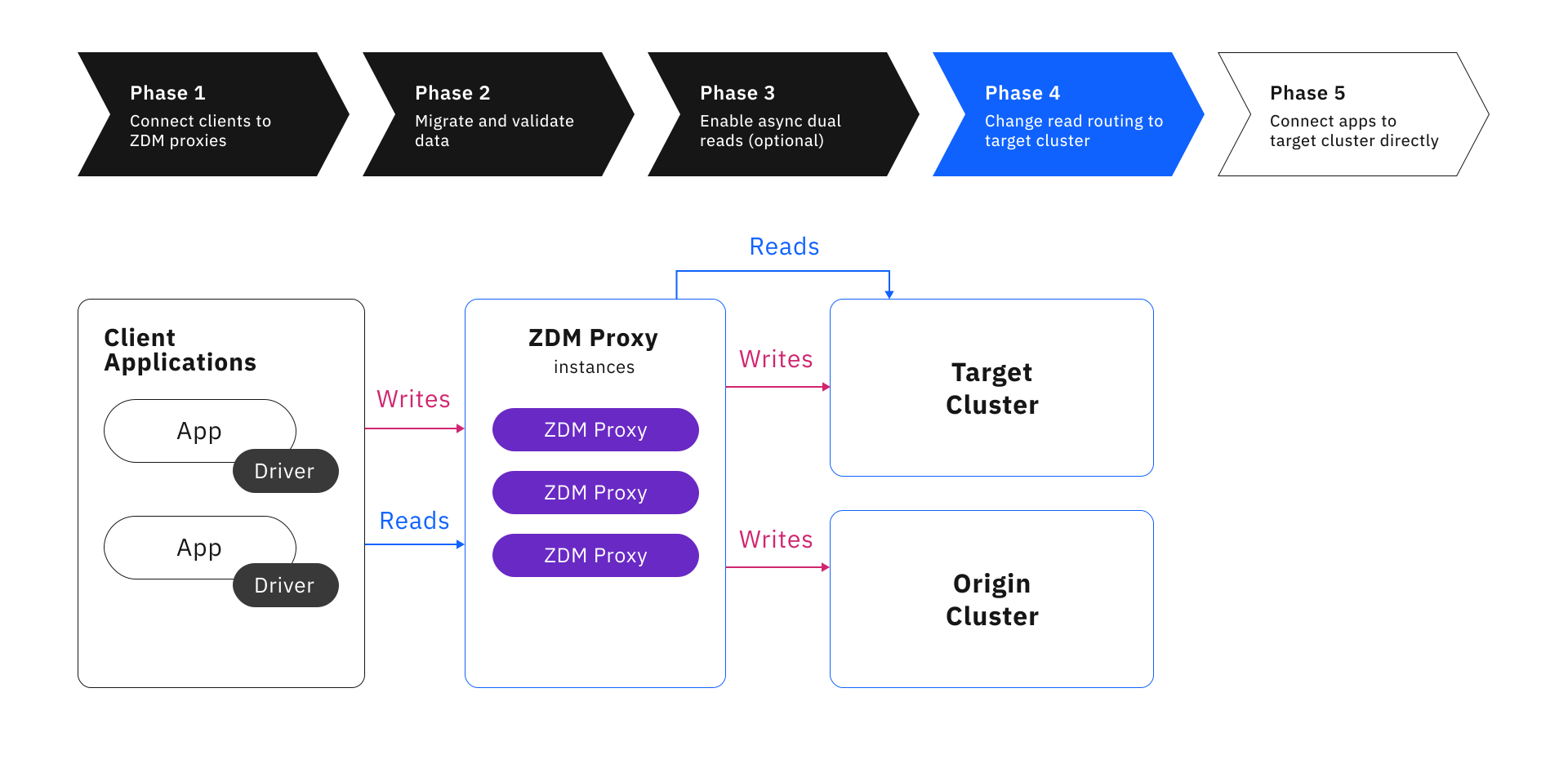
After you migrate and validate your data in Phase 2, and then test your target cluster’s production readiness in Phase 3, you can configure ZDM Proxy to route all read requests to the target cluster instead of the origin cluster.
|
This phase routes production read requests to the target cluster exclusively. Make sure all data is present on the target cluster, and it is prepared to handle full-scale production workloads. |
Prerequisites
-
Complete Phase 2, including thorough data validation and reconciliation of any discrepancies.
The success of Phase 4 depends on the target cluster having all the data from the origin cluster.
If your migration was idle for some time after completing Phase 2, or you skipped Phase 3, DataStax recommends re-validating the data on the target cluster before proceeding.
-
Complete Phase 3, and then disable asynchronous dual reads by setting
read_modetoPRIMARY_ONLY.If you don’t disable asynchronous dual reads, ZDM Proxy sends asynchronous, duplicate read requests to your origin cluster. This is harmless but unnecessary.
Change the read routing configuration
Read routing is controlled by a mutable configuration variable.
-
Edit the ZDM Proxy core configuration file
vars/zdm_proxy_core_config.yml. -
Change the
primary_clustervariable toTARGET. -
Perform a rolling restart to apply the configuration change to your entire ZDM Proxy deployment.
Once the instances are restarted, all reads are routed to the target cluster instead of the origin cluster.
At this point, the target cluster is considered the primary cluster, but ZDM Proxy still keeps the origin cluster synchronized through dual writes.
Verify the read routing change
Once the read routing configuration change has been rolled out, you might want to verify that reads are being sent to the target cluster as expected. This isn’t required, but it can provide confirmation that the change was applied successfully.
However, it is difficult to assess read routing because the purpose of ZDM is to align the clusters and provide an invisible proxy layer between your client application and the database clusters. By design, the data is expected to be identical on both clusters, and your client application has no awareness of which cluster is servicing its requests.
For this reason, the only way to manually test read routing is to intentionally write mismatched test data to the clusters. Then, you can send a read request to ZDM Proxy and see which cluster-specific data is returned, which indicates the cluster that received the read request. There are two ways to do this.
-
Manually create mismatched tables
-
Use the Themis sample client application
To manually create mismatched data, you can create a test table on each cluster, and then write different data to each table.
|
When you write the mismatched data to the tables, make sure you connect to each cluster directly. Don’t connect to ZDM Proxy, because ZDM Proxy will, by design, write the same data to both clusters through dual writes. |
-
Create a small test table on both clusters, such as a simple key/value table. You can use an existing keyspace, or create one for this test specifically. For example:
CREATE TABLE test_keyspace.test_table(k TEXT PRIMARY KEY, v TEXT); -
Use
cqlshto connect directly to the origin cluster, and then insert a row with any key and a value that is specific to the origin cluster. For example:INSERT INTO test_keyspace.test_table(k, v) VALUES ('1', 'Hello from the origin cluster!'); -
Use
cqlshto connect directly to the target cluster, and then insert a row with the same key and a value that is specific to the target cluster. For example:INSERT INTO test_keyspace.test_table(k, v) VALUES ('1', 'Hello from the target cluster!'); -
Use
cqlshto connect to ZDM Proxy, and then issue a read request to your test table. For example:SELECT * FROM test_keyspace.test_table WHERE k = '1';The cluster-specific value in the response tells you which cluster received the read request. For example:
-
If the read request was correctly routed to the target cluster, the result from
test_tablecontainsHello from the target cluster!. -
If the read request was incorrectly routed to the origin cluster, the result from
test_tablecontainsHello from the origin cluster!.
-
-
When you’re done testing, drop the test tables from both clusters. If you created dedicated test keyspaces, drop the keyspaces as well.
The Themis sample client application connects directly to the origin cluster, the target cluster, and ZDM Proxy. It inserts some test data in its own, dedicated table. Then, you can view the results of reads from each source. For more information, see the Themis README.
System tables cannot validate read routing
Issuing a DESCRIBE command or read request to any system table through ZDM Proxy cannot sufficiently validate read routing.
When ZDM Proxy receives system reads, it intercepts them and always routes them to the origin, regardless of the primary_cluster variable.
In some cases, ZDM Proxy partially populates these queries at the proxy level.
This means that system reads don’t represent how ZDM Proxy routes regular read requests.
Although DESCRIBE requests aren’t system reads, they are also resolved differently than other DESCRIBE requests.
Don’t use DESCRIBE requests to verify read routing behavior.
Monitor and troubleshoot read performance
After changing read routing, monitor the performance of ZDM Proxy and the target cluster to ensure reads are succeeding and meeting your performance expectations.
If read requests fail or perform poorly, you can Change the read routing configuration back to ORIGIN while you investigate the issue.
If read requests fail due to missing data, go back to Phase 2 and repeat your data validation and reconciliation processes as needed to rectify the missing data errors.
If your data model includes non-idempotent operations, ensure that this data is handled correctly during data migration, reconciliation, and ongoing dual writes. For more information, see Lightweight Transactions and other non-idempotent operations.
If your target cluster performs poorly, or you skipped Phase 3 previously, go back to Phase 3 to test, adjust, and retest the target cluster before reattempting Phase 4.
Next steps
You can stay at this phase as long as you like. ZDM Proxy continues to perform dual writes to both clusters, keeping the origin and target clusters synchronized.
When you’re ready to complete the migration and stop using your origin cluster, proceed to Phase 5 to disable dual writes and cut over to the target cluster exclusively.
